
Last updated: November 21, 2026
Marketing automation software uses triggers, contact data, and connected channels to capture clinic inquiries, send appropriate follow-ups, and track what happens next. For a U.S. cosmetic or plastic surgery, dental, or medspa practice, the right fit is a workflow that supports staff without making clinical decisions or sending sensitive messages without review. At Anzolo Medical, our marketing automations for medical practices connect outreach with the systems a clinic already uses.
What Is Marketing Automation Software for Medical Practices?
Marketing automation software organizes routine outreach around defined events, such as a website inquiry or appointment booking. The software uses contact data, rules, and connected email or SMS channels to send appropriate messages and record outcomes. Clinic staff remain responsible for sensitive communications, clinical questions, and patient care.
How Do Triggers Turn a Patient Inquiry Into a Follow-Up?
A trigger is an event that starts a workflow. When someone submits a consultation form, the system can create or update a contact record, send a neutral confirmation, and alert the staff member assigned to respond. Follow-up rules can then depend on whether the person replies or books a consultation.
Which Tasks Still Need a Staff Member?
Staff should handle questions about symptoms, suitability for a procedure, treatment recommendations, and messages that are unclear or sensitive. They should also approve message templates and check that replies reach a person rather than remaining in an automated sequence. In clinic marketing practice, a prompt acknowledgment is useful only if the handoff leads to an accurate, helpful response.
Which Clinic Tasks Can Marketing Automation Software Handle?
Clinic automation can route website inquiries, confirm receipt, coordinate approved reminders, and support content publishing. Anzolo Medical connects these tasks with CRM or EHR records, email, SMS, and reporting where the practice’s systems allow. Staff should review patient-facing messages and published content before automation puts them into use.
How Can a Website Inquiry Receive a Prompt Response?
A website form can send an inquiry to the appropriate contact record and notify the reception or consultation team. An immediate confirmation can tell the person that the clinic received the request without repeating sensitive form details. Staff can then answer the inquiry and update its status, giving the workflow a clear next step.
Which Appointment and Post-Visit Messages Can Be Automated?
Depending on the clinic’s permissions and review process, patient communication workflows may include consultation or procedure reminders, post-visit check-ins, review requests, and prompts to schedule an after-photo visit. A generic reminder is different from a message about recovery or a clinical concern; the latter needs staff review and an appropriate care pathway.
An ADA Publishing Dental Practice Success special issue on marketing recommends mapping the patient journey, using reminders, training staff on communication tools, and providing an unsubscribe option for marketing emails. Although written for dental practices, those operational considerations are useful when a cosmetic clinic designs its own messages.
Can Automation Help Keep Website Content Current?
Automation can help organize drafts and publishing tasks for blogs, case studies, and FAQs. Anzolo Medical also uses workflows to identify content gaps and prepare updates. A staff member should verify clinical accuracy, photo permissions, and claims before anything goes live; automatic publishing is not a substitute for editorial approval.
What Features Should a Clinic Look For in Marketing Automation Software?
A clinic should prioritize configurable triggers, reliable routing, usable email and SMS workflows, staff handoff, permissions, opt-out controls, integrations, and funnel reporting. Each feature should solve a specific operational problem, such as an unassigned inquiry or disconnected message history. No feature list, by itself, establishes that a platform will increase bookings.
Which Lead Follow-Up Features Matter Most?
Use a selection checklist tied to the inquiry journey:
- Configurable triggers: Start or stop outreach when a form arrives, a booking is recorded, or a person replies.
- Email and SMS sequencing: Set approved messages for appropriate contacts without sending duplicates across channels.
- Two-way handoff: Make replies visible to staff and pause automated follow-up when a conversation needs a person.
- Permissions and opt-outs: Limit who can view or change records and honor communication preferences across connected tools.
- Clinic CRM integration: Keep inquiry status and message history available where staff work.
Before adding features, trace how an inquiry currently reaches a staff member. Our guide to marketing automation with a CRM for cosmetic clinics explores that handoff in more detail.
What Should Reporting Show Across Channels?
Reporting should show where inquiries originated, whether they reached the right queue, when staff responded, and whether consultations were booked. It should also make opt-outs and stalled follow-ups visible. The Plastic and Reconstructive Surgery Global Open article on marketing a plastic surgery practice recommends measurable objectives and performance measurement using analytics and conversion metrics. A clinic can apply that approach to its own baseline rather than relying on a vendor’s general claims.
Anzolo Medical’s AI-powered insights can flag funnel drop-off, suggest ways to improve conversion rates, and show real-time performance across connected channels. Your team should evaluate suggestions before changing outreach; cross-channel visibility depends on which systems share data.
Which Is the Best Marketing Automation Tool for a Medical Practice?
There is no universal best marketing automation tool for a medical practice. The right choice depends on the clinic’s inquiry workflow, existing records, staff capacity, integration requirements, and verified privacy controls. Compare candidate software through a realistic test of routing, replies, opt-outs, and reporting before committing to a setup.
How Should Clinics Evaluate Marketing Automation Vendors?
A clinic may consider HubSpot, HighLevel, ActiveCampaign, Mailchimp, or Adobe Marketo Engage, but these names are candidates to evaluate, not endorsements for healthcare use. Ask each vendor to demonstrate the clinic’s intended workflow and document connections to its CRM or EHR, email and SMS tools, staff routing, reply-based pauses, opt-outs, and reporting. Check the features available on the proposed plan, access controls, and terms and vendor agreements for the intended data use. Do not assume a product is suitable for protected health information without verification.
Compare the setup options by what staff can see and what the clinic must verify:
| Setup | Staff workflow | What to verify |
|---|---|---|
| Combined CRM and outreach tool | Can staff see inquiry status, replies, and follow-up in one place? | Test routing, opt-outs, access controls, and terms for the intended data. |
| Connected CRM, EHR, and messaging tools, including an Anzolo-configured n8n and Anzolo EHR workflow | Do website inquiries and replies reach the right staff member across systems? | Test integration availability, duplicate messages, permissions, and opt-out synchronization. |
What Software Do Marketing Managers Use?
A marketing manager may use a CRM to track inquiries, email and SMS tools to communicate, analytics to assess outcomes, and an orchestration tool to connect events between systems. Some products combine several functions, but an all-in-one interface is not automatically a better fit than connected tools. The practical question is whether staff can see the right information and take over a conversation without searching across disconnected accounts.
How Is Marketing Automation Software Different From a CRM?
A CRM organizes contacts, inquiry history, and lead status; marketing automation applies rules that initiate and track outreach. An EHR manages clinical records and related care workflows. A clinic may connect these systems so that a new inquiry reaches staff and receives appropriate follow-up without expecting a stand-alone CRM to perform every task.
When Does a Clinic Need Both a CRM and Automation?
A clinic needs both functions when staff must track where an inquiry stands and consistently act on changes in that status. For example, the CRM can show that a consultation was requested, while an automation rule sends an approved acknowledgment and assigns a staff task. Whether those functions live in the same product matters less than whether the handoff works reliably.
Where Does an EHR Fit Into the Workflow?
The EHR is the clinical record system, not a general-purpose marketing list. An integration may need to confirm that an appointment exists or route a request to the right team, but the clinic should determine what information must move between systems and who may access it. Our overview of workflows connecting EHRs, CRMs, and automation provides more context for planning those boundaries.
How Does Anzolo Connect a Clinic’s Marketing Systems?
Anzolo Medical uses n8n and Anzolo EHR to connect clinic marketing and communication workflows. Depending on available integrations and permitted data use, we can coordinate website inquiries, CRM or EHR records, email and SMS tools, Google Ads, social media, and reporting. We determine which data each connection needs and configure handoffs around how staff actually respond.
How Does Anzolo Configure Staff Ownership and Follow-Up Pauses?
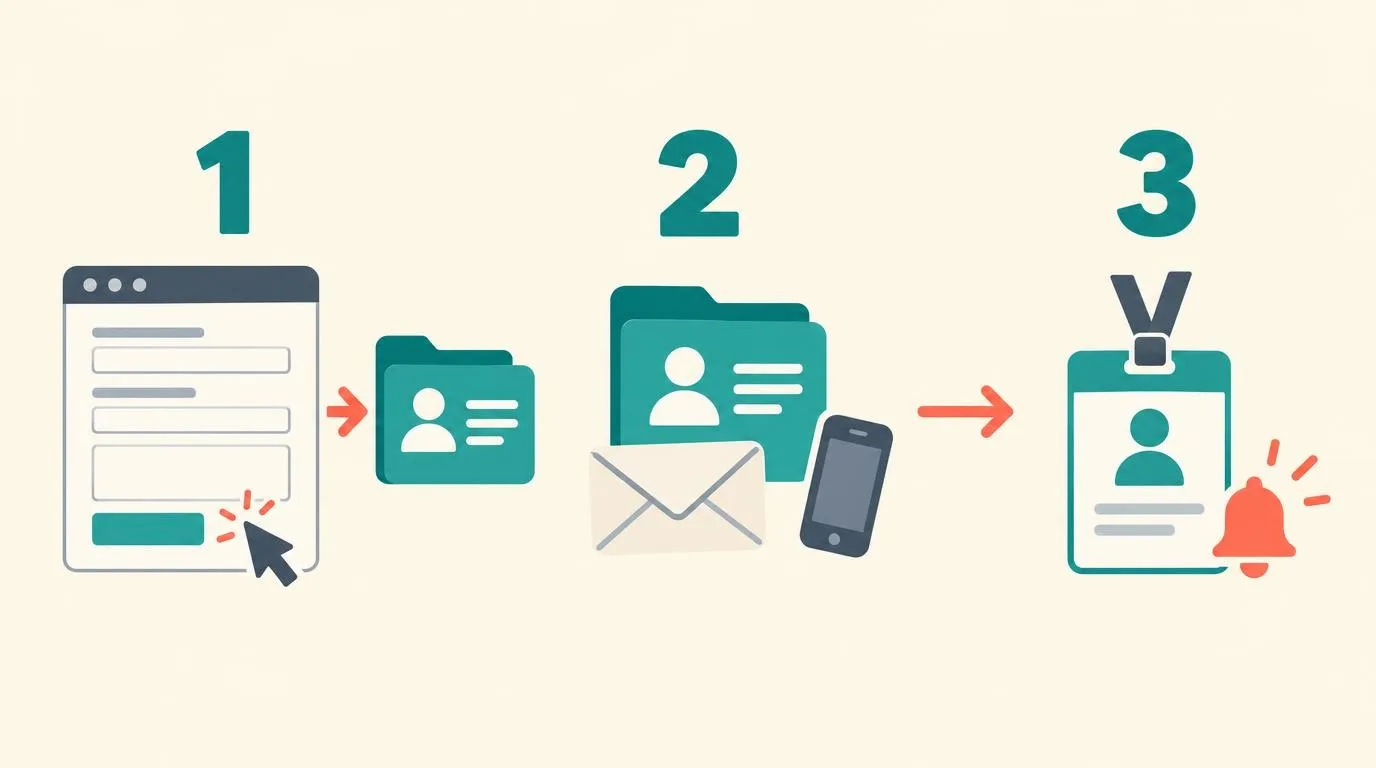
An illustrative workflow follows a clear sequence:
For each clinic, we can define which staff queue owns an inquiry, who checks requests that remain unassigned, and when an approved follow-up sequence pauses after a reply or booking. We test those handoffs with sample replies, including after-hours messages, so the team knows who takes over and when automated outreach must remain paused.
Which Systems Can Be Connected Without Replacing Everything?
We start by identifying an integration already available in the clinic’s tools and choosing one workflow to connect. We map only the fields needed for that handoff, then test whether the assigned staff member receives and can act on the request. Once the handoff works, we can add another connection or reporting step without replacing tools that already serve the team.
How Can U.S. Clinics Protect Patient Privacy in Automated Outreach?
U.S. clinics should review the data, purpose, recipient, and vendor behind every automated message before launch. A workflow that handles protected health information may require different safeguards from a general inquiry acknowledgment. Appropriate agreements, access controls, consent practices, opt-outs, photo authorization, and staff review all need assessment for the specific use.
When Do HIPAA Rules Affect an Automated Message?
HIPAA questions arise when a covered clinic or its service providers create, receive, maintain, or transmit protected health information in a workflow. An appointment-related communication and a promotional campaign may have different requirements. The clinic should determine which information the message and connected systems expose, whether a vendor agreement is required, and who can access the records. Legal or compliance review is appropriate before treating any configuration as compliant.
What Consent and Review Steps Should a Clinic Check?
- Confirm the intended purpose and permitted audience for each email or SMS message.
- Check applicable text-message consent requirements and make opt-outs work across connected tools.
- Keep reminders and confirmations from unnecessarily disclosing sensitive details.
- Review email unsubscribe handling and the clinic’s review-request practices.
- Obtain and document appropriate authorization before using patient photos or identifiable case details in content.
- Assign staff to review templates, responses, and access permissions as workflows change.
No platform name or integration diagram can establish compliance on its own; the clinic must assess the actual workflow.
How Should a Clinic Roll Out Marketing Automation Software?
A clinic should start by mapping its current inquiry journey, then test a limited workflow before expanding. Verify integrations and message permissions, test routing and opt-outs, train staff on handoffs, and review live results. At Anzolo Medical, basic automations can run within days, while more advanced workflows may take a few weeks; each practice’s setup differs.
Which Workflow Should Be Tested First?
Website inquiry acknowledgment and staff routing are a practical starting point because the clinic can check whether every submission reaches the intended queue. Use test inquiries to confirm record creation, message wording, duplicate handling, and what happens when a form contains a sensitive question. Expand only after staff can follow the complete path from submission to response.
When Should Staff Review and Take Over a Conversation?
Staff should take over when someone asks a clinical question, reports a concern, requests a change the workflow cannot verify, or replies in a way the rules do not clearly handle. Train the team to recognize these handoff points and to pause further automated messages when a personal response is underway.
How Can Clinics Tell Whether Automation Is Working?
Clinics can evaluate automation by comparing response, routing, booking, and message-quality measures with their own starting point. Useful measures include time to first response, inquiries successfully assigned, completed follow-ups, consultation bookings, no-shows, opt-outs, and funnel drop-off. Accurate messages and dependable staff handoffs matter alongside message volume.
Which Funnel Metrics Reveal Missed Follow-Ups?
Look for inquiries without an owner, confirmations that failed to send, replies that received no staff response, and contacts that stopped progressing toward a consultation. Break results down by inquiry source where the data permits, so a form or channel problem is easier to locate. Our clinic marketing automation strategy guide explains how to set goals and measure results against them.
How Can a Clinic Check Message Quality as Well as Volume?
Review a sample of actual message paths, including replies, opt-outs, and staff takeovers. Check whether the language is accurate, the timing fits the inquiry, and a person can readily reach the clinic. A workflow sending more messages is not necessarily better if those messages are confusing or continue after staff have begun a conversation.
Frequently Asked Questions
Is there a 100% free CRM?
Some vendors offer free CRM plans, but their features and terms vary. A free plan does not establish that it is suitable for protected health information. Before entering patient data, verify the intended use, safeguards, and appropriate vendor agreements, including a business associate agreement where required.
What are the top 10 automated businesses?
There is no top-10 ranking of automated business models that tells a clinic which marketing software to choose. An automated business model describes how a business operates; marketing automation software handles specific tasks within your existing practice. Compare tools by how well they route inquiries, support approved communications, connect your systems, and hand questions to staff.
Can marketing automation help a cosmetic clinic reconnect with inactive patients?
Yes. A clinic can use an approved recall or reactivation campaign to contact eligible patients who have not returned, provided their communication preferences and the campaign’s purpose permit it. In an ADA News article on practice automation, a dental marketing vendor recommends timely recall and reactivation campaigns; cosmetic clinics should tailor the approach to their own patients.
Can patients complete intake forms before a cosmetic consultation?
Yes, if the clinic offers electronic intake forms, patients can complete much of their paperwork before arriving. The ADA News article describes electronic forms as a way to streamline dental intake. A cosmetic clinic should keep intake information in an appropriate system rather than copying sensitive answers into marketing emails or texts.
Can automation send educational content before an elective procedure consultation?
Yes, a clinic can send staff-approved educational material before a consultation when the recipient and communication permissions are appropriate. The ADA News article describes a vendor’s recommendation to use educational videos in dental waiting rooms to help patients learn about elective treatments. For cosmetic surgery, general information can help patients prepare questions, but it must not substitute for an individual assessment or treatment recommendation.
Which email metrics should a clinic track beyond consultation bookings?
Track delivery, bounces, opens, clicks, and unsubscribes alongside consultation bookings. An American Dental Association advertiser media kit shows those email measures and performance over time in a campaign aimed at reaching dentists. Review them by campaign to spot delivery or engagement problems, but judge success against the clinic’s own goals and actual patient follow-through.
What should a cosmetic clinic check before using retargeting pixels?
Check which website activity the pixel collects, which vendor receives it, and whether it could expose sensitive information about visitors. The American Society of Plastic Surgeons’ cookie policy distinguishes targeting and advertising cookies from marketing automation cookies. A clinic should assess its own tracking setup and privacy obligations before enabling retargeting.
What is a SMART goal for a clinic marketing automation pilot?
A SMART goal is specific, measurable, actionable, relevant, and time-bound, as described in Plastic and Reconstructive Surgery Global Open. For an inquiry-routing pilot, a clinic could set a deadline to reduce unassigned website inquiries against its recorded baseline, then measure assignments and staff response times during the test.
Is Marketing Automation Software the Right Next Step for Your Clinic?
Marketing automation software is worth evaluating when a clinic’s inquiries, follow-ups, or communication records are difficult for staff to coordinate. Start with the workflow and privacy requirements, then decide which existing tools should connect and which tasks need a person. A connected, staff-supervised setup may suit a U.S. cosmetic or plastic surgery practice.
If your team wants a clearer path from website inquiry to thoughtful follow-up, contact Anzolo Medical for a consultation. We can review your current systems, identify a useful starting workflow, and discuss how automation can support the staff members who care for your patients.

